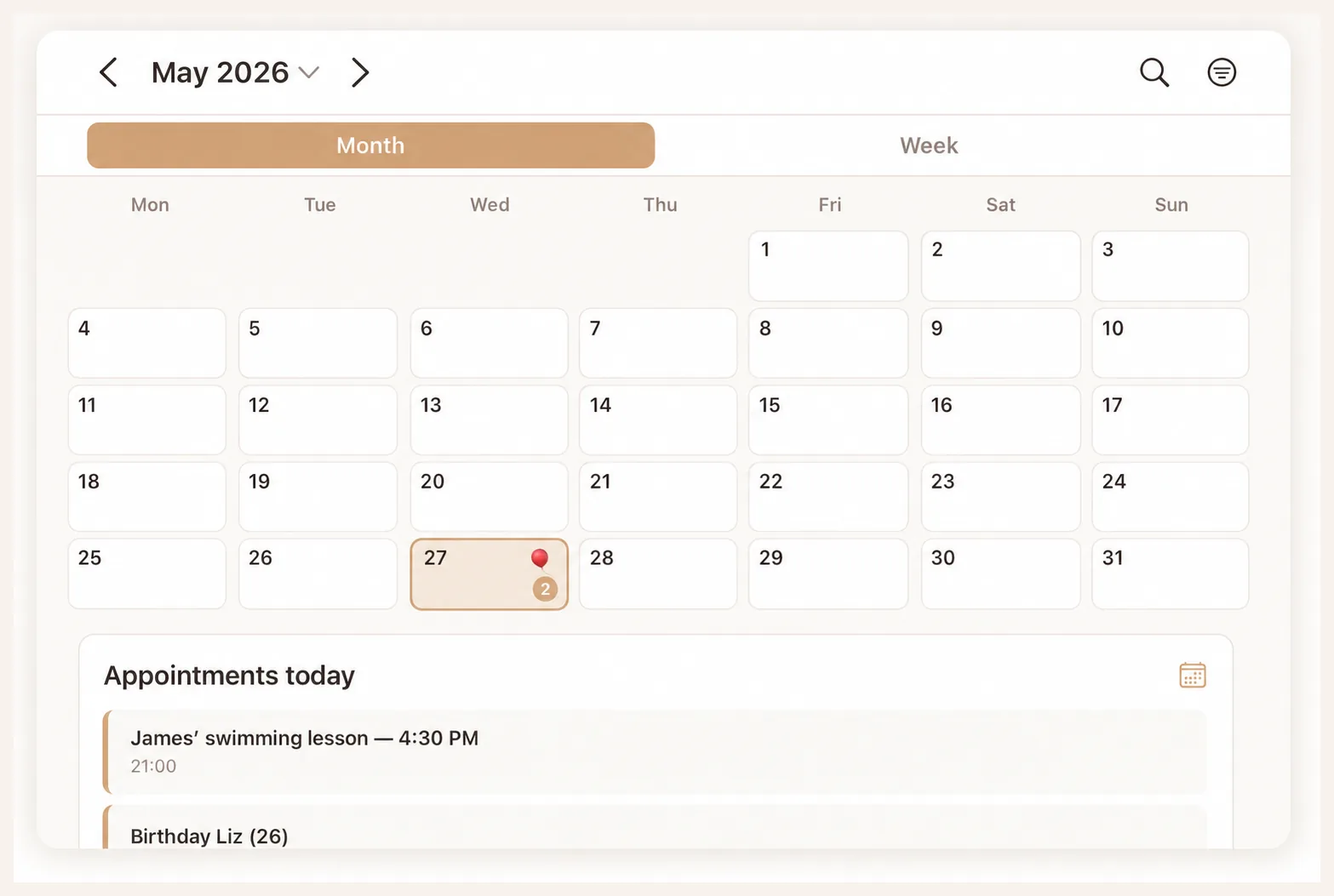
Shared plans, fewer follow-up questions

A shared calendar app for couples and families.

A shared calendar app gives you and your partner one place to coordinate family appointments. School, activities, work and pickups need more than a time slot: they need a clear person responsible. Flow Fam brings a shared family calendar together with tasks, grocery lists and other household planning. Use this guide to choose a setup and get started together.

Flow Fam

How to choose a shared calendar app

The best shared calendar app is one you both keep using. Try these four checks before moving your schedule.

A shared calendar app for couples

Try one appointment that affects both of you: dinner out, a work shift or a visit. Check whether the other person understands the time and location and can handle an update independently. For two people, a clear overview often matters more than extensive settings.

A family calendar app for everyday logistics

Children add school pickups, childcare and activities. Give each appointment a clear person responsible. Share with relatives or caregivers only what they need to help. Agree which events each person maintains so the calendar does not become another responsibility for one parent.

Check iPhone and other device requirements

Check current system requirements and whether everyone involved can participate. The link on this page opens Flow Fam in the App Store. If your household uses different devices, investigate available versions and features before moving the family schedule.

Calendar sharing or a family organizer?

A calendar explains when something happens. A task explains what needs doing before or after it. Consider Flow Fam if you want that household organization together. Compare features and check current terms on the comparison page and App Store listing.

A couple’s calendar, shared calendar or family calendar?

A shared calendar app for couples

Include commitments that affect each other: visits, evenings out, changed work hours or occasions when one person needs the car. The purpose is to coordinate availability without having to ask about every separate calendar.

A calendar for the whole family

A family calendar includes children and other people involved in daily life. Appointments often need transport or preparation too. Make the plan more useful by naming who attends, who drives and who collects.

A calendar app or a family organiser

A calendar app focuses on time and appointments. A family organiser may add tasks, shopping or documents. Keep the arrangement simple if appointments are all you need; compare additional features when you want to organise more.

What belongs in your shared calendar?

A busy calendar is not necessarily a clear one. Share commitments that affect others without making every personal detail visible.

Commitments that need coordination

Include school, childcare, sport, visitors and late arrivals home when another person needs to account for them. Add a finish time when it determines whether the next appointment is realistic.

Transport and preparation

An appointment might require one adult to be available and another to collect later. Name those responsibilities. Keep an earlier preparation task separate when necessary, such as completing a form or packing equipment.

Availability without personal details

Sometimes your partner only needs to know that you are unavailable for an hour. Agree when a neutral block is enough. Check access settings before involving relatives, and share only what they need.

Set up your shared calendar in five steps

  1. Choose a single starting point

    Agree where shared commitments are maintained. If an event exists in a chat, on paper and in two apps, it is unclear which version is current. Give each type of appointment one original source.

  2. Make entries understandable to someone else

    Use a short title with a name and activity, then add time, location and responsibility where needed. “Noor — swimming — Sam collecting” is more useful than “swimming”. Colour can help, but should not carry all the meaning.

  3. Check repeating commitments

    If your chosen app supports recurring events, review individual changes during holidays and shifted lessons. Make sure you are changing one event or the whole series as intended.

  4. Agree how changes are communicated

    The person driving needs a revised location; someone merely following the plan may need fewer alerts. Communicate urgent changes directly if somebody is already travelling.

  5. Hold a short joint review

    Look for clashes, unrealistic travel times and journeys without an owner. Finish with decisions still needed. Add more categories or connections only when they solve a specific problem.

What a clear shared plan looks like

This fictional example shows useful information beyond the start time. Practical agreements make the calendar work.

What a clear shared plan looks like
AppointmentIncludeAgree together
Monday: swimmingName, location and finish timeWho drives and who collects?
Tuesday: home lateUntil when unavailableWho handles dinner?
Wednesday: school eventEquipment to bringWho checks preparation?
Thursday: rescheduled eventNew time in the agreed placeHas the person involved seen the change?
Sunday: weekly reviewUnresolved questionsWhich appointment still needs an owner?

Use a shared calendar with Flow Fam

Flow Fam’s App Store listing describes a shared family calendar, tasks, reminders and personal connection codes for trusted relatives. It is a way to keep appointments alongside other household responsibilities. Explore the calendar feature to see how the app presents the shared view.

Check current devices and terms before choosing. If you want to connect existing calendars, investigate the difference between displaying, importing and synchronising. Seeing an event does not automatically mean changes flow in both directions. Test an actual update before depending on a connection.

Flow Fam · App Store

Shared calendar questions

What is a shared calendar app?

A shared calendar app lets multiple people view the same schedule and, depending on permissions, update it. Couples and families need to see who has an appointment and who handles preparation or transport.

Can couples use Flow Fam as a shared calendar app?

Flow Fam combines a shared family calendar with tasks and grocery lists, bringing appointments and household responsibilities together. Explore the features and current App Store information to decide whether it fits your routine.

What should I check in a free shared calendar app?

Check which features are free, whether there are ads or in-app purchases and what happens after any trial ends. Compare the cost for everyone who needs access. Flow Fam’s current pricing and terms appear in its App Store listing.

What is the best shared calendar for two people?

It depends on what you want to share. A calendar may cover appointments alone. If you also need tasks, shopping and household information, consider a family app such as Flow Fam and test whether both people can contribute independently.

How do I share a calendar with my partner?

Choose a tool supporting shared access, follow its invitation instructions and check who can view or edit. Add a test appointment, change its time and check the result on both devices.

Is sharing a calendar the same as synchronising calendars?

No. Sharing provides access to a common view. Synchronisation updates information between calendars or systems. Capabilities depend on the app and connection.

Can a shared calendar work on iPhone and Android?

Check each provider’s current platform support and feature availability. The link here leads to Flow Fam for iPhone and iPad; confirm other platforms with the provider.

How can we avoid duplicate appointments?

Give each appointment type one original source. Check whether an event is already displayed from another calendar before adding it, and maintain changes in the agreed place.